

Official BambiSleep software with a verified publisher identity.
BambiSleep Desktop
BambiSleep, builtfor your desktop.
A free Windows companion for deep listening, local sessions, visual overlays, and supporter-powered community sharing.
Download is for Windows 10 / 11. Open this page on a Windows machine to install BambiSleep Desktop.
Built with trust
Confidence from download to daily use.
Official Windows releases are digitally signed and integrity-checked.
Get the installer through the official BambiSleep download channel.
The app checks BambiSleep’s official release channel for updates.
Developed and maintained by the BambiSleep team.
Free to install and use
Listen with the desktop player, browse the free hypno library, build queues, save playlists, and keep your local content organized without paying for the app.
Secure Login
Use the BambiSleep username and password login for connected features. Existing BambiID accounts remain supported during the transition.
Supporter powered sharing
Active supporter accounts can publish, download, like, and import shared community sessions.
Built-in update channel
The app checks the official desktop update manifest and opens the newest installer when an update is available.
Why install it
The browser is fine.The desktop app is intentional.
BambiSleep Desktop is for listeners who want their sessions to feel separate from tabs, notifications, and browser clutter. It gives the BambiSleep experience its own local place: a player, a queue, saved sessions, overlay visuals, cache, and tools that stay with you.
You can use the app for free. Logging in with your BambiSleep account unlocks connected identity features. Existing BambiID accounts remain supported during the transition. An active supporter account unlocks sharing, loading, publishing, and importing community sessions.
What you get
Your complete BambiSleep session workspace.
Download once and keep the tools for listening, building, saving, and sharing sessions together in one focused Windows app.
Desktop player and queue
Load tracks into a focused native player with queue controls, playlist loading, pause, stop, progress, and a compact always-ready listening surface.
Free library plus local disk
Browse Beginner, Advanced, Expert, Creator, and Disk sources. Queue online files or add your own local audio from the BambiSleep content folder.
Local playlists and sessions
Save playlists locally, export full sessions, import .bssession bundles, and keep My Sessions and Downloaded Sessions organized on disk.
Community session exchange
Supporters can open online sessions, download shared bundles, like community work, and publish their own session packages with tags and descriptions.
Desktop overlay and prompts
Run a separate visual overlay with fractal or hypnosphere modes, image or video backgrounds, audio-reactive motion, and timed prompt files.
Creator tools for session building
Use the prompt builder and scene extractor to create overlay prompts and short video clips for richer sessions.
Local cache and content folder
Choose where content lives, repair the folder structure, clear temporary cache, and keep standard free-library audio cached for smoother playback.
Spectrum and EQ controls
Open the spectrum EQ panel for a more tuned listening experience, including reset and auto controls.
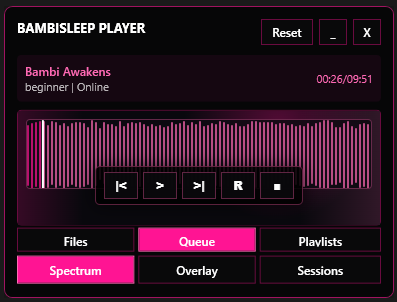
Focused BambiSleep Player with transport controls and quick access to Files, Queue, Playlists, Spectrum, Overlay, and Sessions.
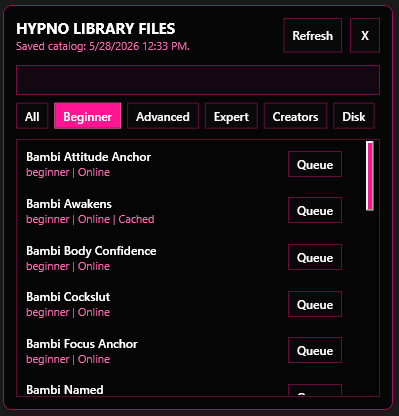
Load free library tracks, supported creator files, and your own local audio into the same player queue. Mix online and disk files into one session, then save the playlist locally or sync it into your BambiSleep cloud space when it is ready.
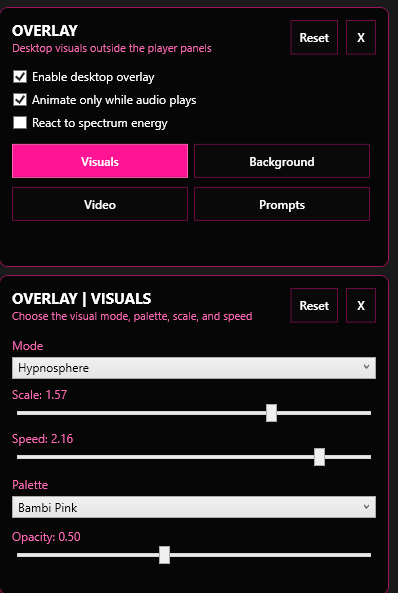
Build layered sessions with videos, random clips from a local folder, hypnosphere visuals, timed prompts, and audio-reactive motion over your hypno audio. Add video sound when you want it, keep hypnosis audio in the player, and use the scene extractor to cut longer videos into just the clips you like.
Private cloud sessions
Build a complete session, not just a playlist.
Package the whole experience into one portable BambiSleep session and go as deep as you want with local files, online tracks, visuals, and shared content.
One complete session bundle
Save the queue, title, description, playlists, prompts, overlay settings, background videos, and video clip packs together in a portable .bssession file.
Private-first cloud sharing
Keep sessions in your private local library, or publish a finished bundle to the BambiSleep community cloud when you want to share it with other supporters.
Download and import
Browse shared sessions, filter by tags, download complete bundles, verify the package, and import them into your local Downloaded Sessions library.
Local and online depth
Mix cached local audio with online library references, then layer in visuals, prompts, single videos, or randomized clips for a session built around your intention.
Tools: Scene Extractor
Turn long compilations into your own clip library.
Use the built-in Scene Extractor to detect cuts in a local compilation video, create separate MP4 scenes, and prepare them for Overlay sessions.
Choose a source video
Load common local formats including MP4, MKV, MOV, WebM, AVI, and M4V. The source stays on your computer while the clips are created.
Control scene detection
Adjust sensitivity to find more or fewer cuts, and use end trim to remove a small tail from each scene.
Build organized folders
Clips are exported as numbered MP4 files into your chosen folder under video_clips. Existing clips remain intact and new files continue the sequence.
Use them in Overlay
Select the clip folder in Overlay, combine it with visuals and prompts, and enable random playback for a changing visual session.
BROWSER COMPANIONKeep your
Keep your
favorite pages
within reach.
Open BambiSleep, HypnoTube, Bambi Trainer, or any saved link in a focused companion window.
HYPNOTUBEWatch in
Watch in
full screen.
Supported video pages can use the full display when the site requests full-screen playback.
Browser companion
A private companion window for the web.
The desktop app includes a focused phone and tablet companion surface. Open BambiSleep, HypnoTube, Bambi Trainer, or any URL inside the app instead of mixing those sessions into your everyday browser tabs. It is designed for anonymous, privacy-focused use with a compact control rail and local saved links.
Switch between a narrow phone layout and a wider tablet layout with one control.
Type a URL or use quick links for BambiSleep, HypnoTube, Bambi Trainer, guides, and library pages.
Play web audio and supported video sites inside the companion; full-screen playback is handled by the app.
Save the current page to local favorites, reopen it from Home, and remove links whenever you want.
Panic hide pauses page audio and video, hides the companion, and minimizes the app when you need privacy.
Build with us
Help shape the next BambiSleep release.
We build the functions users need most. Upvote an update that would be useful to you, share a practical idea, and participate in what comes next. Feature requests are submitted directly from the installed desktop app with your BambiSleep account.
SuggestUpvoteParticipate
Open feedbackReady to bring
Bambi to every screen?
Your website, mobile and TV — always in sync.